


Live Flight Tracker™ - 3D View
0.00.00 Reviews
App Specs
- Version
- 1.0.6
- Updated On
- License
- Free
- Downloads
- 50,000+
- Developer
- Fast Tour Booking - Flights & Hotels
- Categories
- Travel & Local
- Platform
- Android
Screenshots

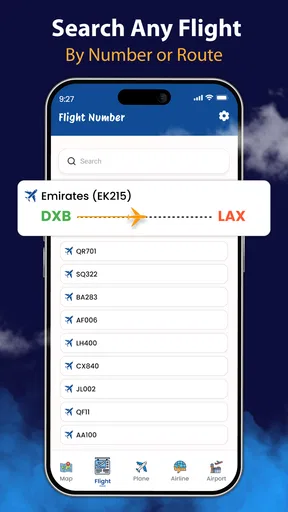
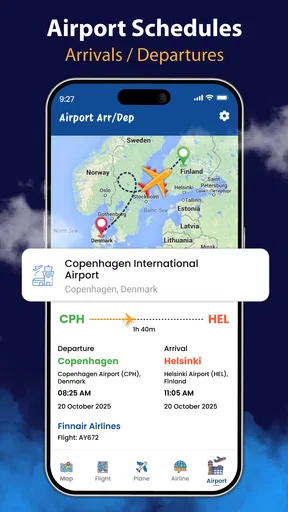
 Analysis by AppCompare
I think a flight tracker is most useful when it reduces uncertainty rather than simply showing a plane moving across a map. Live Flight Tracker™ - 3D View puts the visual side of following a flight front and center, while its stated focus on live tracking and AI travel guidance points toward a broader travel companion. That mix is appealing if you like checking progress at a glance, though I’d treat any tracker as a helpful extra—not a replacement for airline or airport announcements when plans are changing quickly.
Where a moving map earns its place
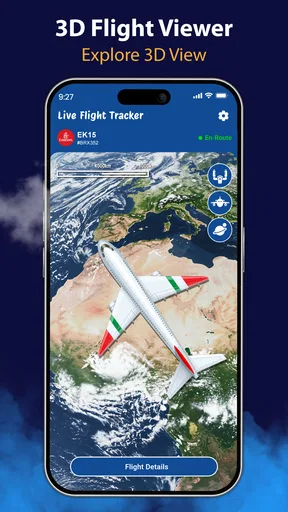
The clearest reason to try this app is the way a 3D view can make a flight’s progress easier to picture than a line of status text. When I’m waiting for someone to land, a map gives me a quick sense of where the journey has reached and whether it is still underway. That can be more engaging than repeatedly refreshing a generic flight-status page, especially when I’m at home or meeting someone at arrivals.
There’s also a practical distinction between watching a route and acting on a travel update. A map can help me understand the overall journey, but the detail that matters most near departure is usually the latest status, gate or schedule information. I’d use the visual view for orientation and then check the airline’s own notices before making a time-sensitive decision, such as leaving for the airport or changing a pickup plan.
Useful for travelers and the people waiting for them
A realistic use is collecting a friend from the airport after work. Rather than asking them for repeated updates while they are in transit, I can follow the flight and time my journey to the terminal more sensibly. The same approach can help when coordinating a family pickup: the tracker gives the person waiting something to consult, while the traveler can focus on getting through the journey.
It may also suit someone who enjoys aviation and wants a more visual way to follow a flight. That interest is different from a need to manage a booking. If I only want to confirm my own reservation, choose a seat or resolve a ticket issue, a tracker is not the right tool; the airline’s app or booking account is the better place to handle those tasks. I see this app as a companion to travel arrangements, not a booking desk.
How it fits beside the usual options
Compared with checking a departure board, a dedicated tracker can be more convenient when I want to follow one flight away from the terminal. Compared with an airline app, it may offer a more flight-centered view, but the airline remains the more direct source for matters tied to a ticket or a carrier’s operational notices. Those tools answer different questions, so I wouldn’t expect one to replace the other.
For a quick check, a search engine or airport display may be enough. If I want to watch a flight’s progress or explore the route visually, a tracker has a clearer purpose. The trade-off is that an extra app adds another place to check, and using several sources can create confusion if their status displays do not update at the same moment. I’d pick one source for flight movement and verify important travel decisions with the airline.
Worth Reading Before You Choose

Flipboard Shows What News Apps Must Do Beyond the Feed

Switching to Android Auto Means Rethinking Your Driving Routine

Google Calendar Makes a Crowded Week Easier to Manage

Ludo King Makes the Most of the Minutes Between Plans

Baby Panda World Brings Quick Play to Modern Phones, but Its Game Library Feels Busy

ESPN’s Live Game View Makes Following Close Games Easier
Small habits that make tracking more useful
Before relying on a live map, I’d make sure I’m following the intended flight rather than one with a similar route or schedule. This matters especially when a traveler has a connection or when several flights are headed to the same city. Confirming the flight details with the person traveling is a simple step that can prevent a perfectly accurate map from answering the wrong question.
I’d also use tracking to plan a flexible arrival at the airport, not to calculate an exact minute for pickup. The final approach, landing, taxiing, and the time it takes to reach the arrivals area are separate parts of the process. A plane appearing close to its destination is a useful cue to get ready; it is not a promise that the passenger will be outside immediately.
The store presents this as a Travel & Local app from Fast Tour Booking - Flights & Hotels. It is free to install, has an Everyone age rating, and shows a 0.0 average rating with 10K+ installs. Those figures are context rather than proof of how well it will suit a particular traveler. The app was released on February 2, 2026, and version 1.0.4 is the current version. It supports Android 7.0 or later, with in-app purchases listed at $14.99 per item, so I’d check the purchase screen carefully before paying for anything.
The AI travel assistant guidance is another reason a curious traveler might take a look, but I’d approach any automated advice as a starting point rather than the final word. Travel plans can depend on a specific airline, ticket, airport process, or disruption. For decisions involving a missed connection, rebooking, or a change to a reservation, I’d contact the carrier directly. That is a sensible boundary for any general travel assistant, not a criticism unique to this app.
I would skip it if I rarely fly and only need a one-off departure time, since an airport board or airline notification may already cover that need. I’d also avoid depending on a tracker as my only source during a disruption. Its best fit is someone who follows flights often, enjoys a map-based view, or regularly coordinates airport pickups—and who is comfortable keeping a separate channel for official booking information.
Ever been at the airport, squinting at those overcrowded departure boards, wishing you had a personal assistant to keep tabs on your flight? Enter Live Flight Tracker™ - 3D View. I’ve spent some time with this app, and let me tell you, it’s a game changer for travel enthusiasts and frequent flyers alike.
First Impressions
When I first opened Live Flight Tracker™ - 3D View, I was greeted by a sleek and intuitive interface. It’s like having your own flight control center right in your pocket. The app is available for both Android and iOS, so no worries about compatibility. The design is modern and user-friendly, with everything you need just a tap away.
Features That Stand Out
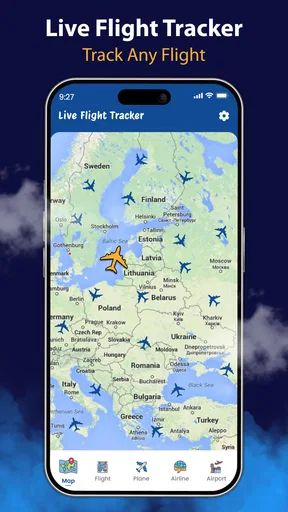
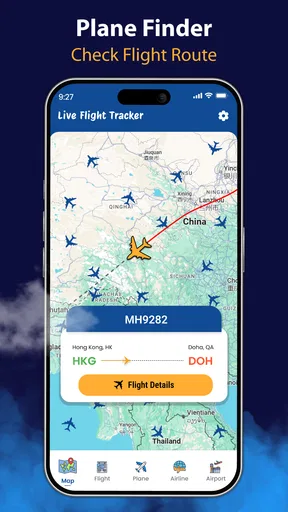
Now, let’s dig into the features. One of the coolest aspects is the 3D view of flights. Imagine watching your flight soar through the air, just like in a flight simulation game. It’s not only fun but also incredibly informative. You can track flights in real-time with a detailed map view, which is perfect for keeping an eye on your own flights or even stalking, ahem, I mean tracking, friends and family as they travel.
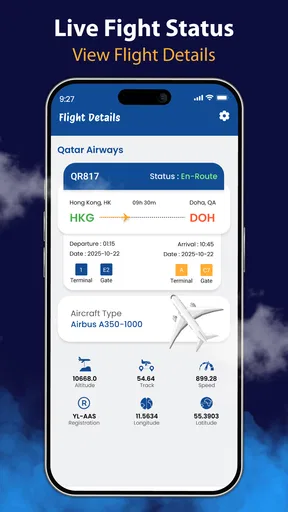
The app also provides comprehensive flight details. You get information on departure and arrival times, delays, gate information, and even baggage claim details. It’s like having a mini control tower in your hand. And if you’re worried about missing any updates, the push notifications are there to save the day.
Usability and Performance
As someone who’s used various tracking apps, I can confidently say this one performs smoothly. There’s little to no lag when switching between features, and the real-time updates are impressively quick. It’s optimized for both smartphones and tablets, so you get a seamless experience regardless of your device.
One thing I noticed is how the app manages to deliver complex data in a simple manner. Even if you’re not a tech-savvy traveler, you’ll find it easy to navigate. The app doesn’t overwhelm you with information but presents it in a digestible format.
Additional Goodies
Aside from tracking flights, the app offers some nice extras. There’s a feature that allows you to check on the weather conditions at your destination airport, which is a handy addition for planning your travels. Plus, the airport maps are a lifesaver when navigating through unfamiliar terminals.
And here’s a little bonus for the aviation geeks out there: you can access detailed information about the aircraft, including model, age, and even average speed. It’s a fun way to pass the time while you wait for your flight.
What Could Be Improved
While the app is pretty solid, there’s always room for improvement. I found that the 3D view, although visually impressive, might not be everyone’s cup of tea. It can be a bit resource-heavy, so make sure your device is up to the task. Additionally, while the app does a great job of covering major airlines and airports, some smaller or regional flights might not be as thoroughly covered.
Final Thoughts
Overall, Live Flight Tracker™ - 3D View is an essential tool for anyone who travels frequently. It combines functionality with a touch of fun, making flight tracking an engaging experience. Whether you’re an occasional traveler or a frequent flyer, having this app in your arsenal will make your journeys smoother and more enjoyable.
So, if you’re ready to take your travel experience to the next level, give this app a try. It’s like having a travel buddy who’s got all the flight details covered, leaving you to just sit back and enjoy the journey.
Pros
- Real-time updates with minimal lag.
- Detailed 3D view enhances tracking experience.
- User-friendly interface for easy navigation.
- Comprehensive airport and flight data.
- Customizable alerts for flight changes.
Cons
- Can consume significant battery life.
- Requires stable internet connection.
- Some features need in-app purchases.
- Occasional glitches in 3D rendering.
- Limited offline functionality.
FAQs for Live Flight Tracker™ - 3D View
What features does Live Flight Tracker™ - 3D View offer?
Live Flight Tracker™ - 3D View provides real-time flight tracking in a dynamic 3D view, showing aircraft routes, altitudes, and speeds. Users can access detailed flight information, set alerts for specific flights, and explore a comprehensive map interface. The app also offers airport information and weather updates.
Is Live Flight Tracker™ - 3D View available for both Android and iOS?
Yes, Live Flight Tracker™ - 3D View is available on both Android and iOS platforms. Users can download the app from the Google Play Store for Android devices or the Apple App Store for iOS devices to enjoy seamless flight tracking on their smartphones or tablets.
Does Live Flight Tracker™ - 3D View require a subscription?
Live Flight Tracker™ - 3D View offers both free and premium subscription options. The free version provides basic features, while the premium subscription unlocks advanced features such as unlimited alerts, ad-free experience, and access to historical flight data. Pricing details are available within the app.
How accurate is the flight tracking information in the app?
The app utilizes real-time data from multiple sources, including aviation authorities and commercial airlines, to provide accurate and up-to-date flight information. While it strives for precision, occasional discrepancies may occur due to data source limitations or technical issues. Users are encouraged to verify critical information independently.
Can I track flights worldwide using Live Flight Tracker™ - 3D View?
Yes, Live Flight Tracker™ - 3D View allows users to track flights globally. The app covers a vast range of international and domestic flights, providing users with a comprehensive tool for monitoring air traffic across the world. The extensive coverage makes it a valuable resource for frequent travelers.


